Anatomy of a phishing email
Why can a carefully written message feel routine? This research examines a self-crafted dental appointment example.
Why phishing still matters
Phishing tries to influence a person into taking an action: opening a file, following a link, replying, or sharing information. Its success can depend as much on timing and context as on technical tricks. A familiar service, plausible request, or sense of urgency can make a message feel relevant before the recipient has checked who sent it.
The research document cites Verizon’s 2025 DBIR and Proofpoint’s human-targeted threat research to frame phishing as a continuing route to people and organizations. It also cites Hoxhunt’s 2026 report, which describes phishing messages becoming more polished while older techniques remain in use.
These figures describe different datasets and methods. Hoxhunt’s AI figures are based on surface indicators in messages reported to its network; they should not be read as estimates of all phishing worldwide. The source document also cites phishing at approximately 15% of breaches; check the linked DBIR for its definitions and findings before reusing that figure.
The details that make a message feel believable
The example uses a dental appointment because it is a situation some recipients may genuinely expect. Its premise assumes an attacker already knows the recipient’s email address and has reason to associate them with a clinic or appointment. Without that context, the same message is less convincing.
Several cues work together: a clinic identity and professional layout establish familiarity; a service, date, time, and location create specificity; a claimed scheduling-system update supplies a reason to act; and “Appointment confirmation required” adds pressure. A prominent review button makes the next step easy to recognize.
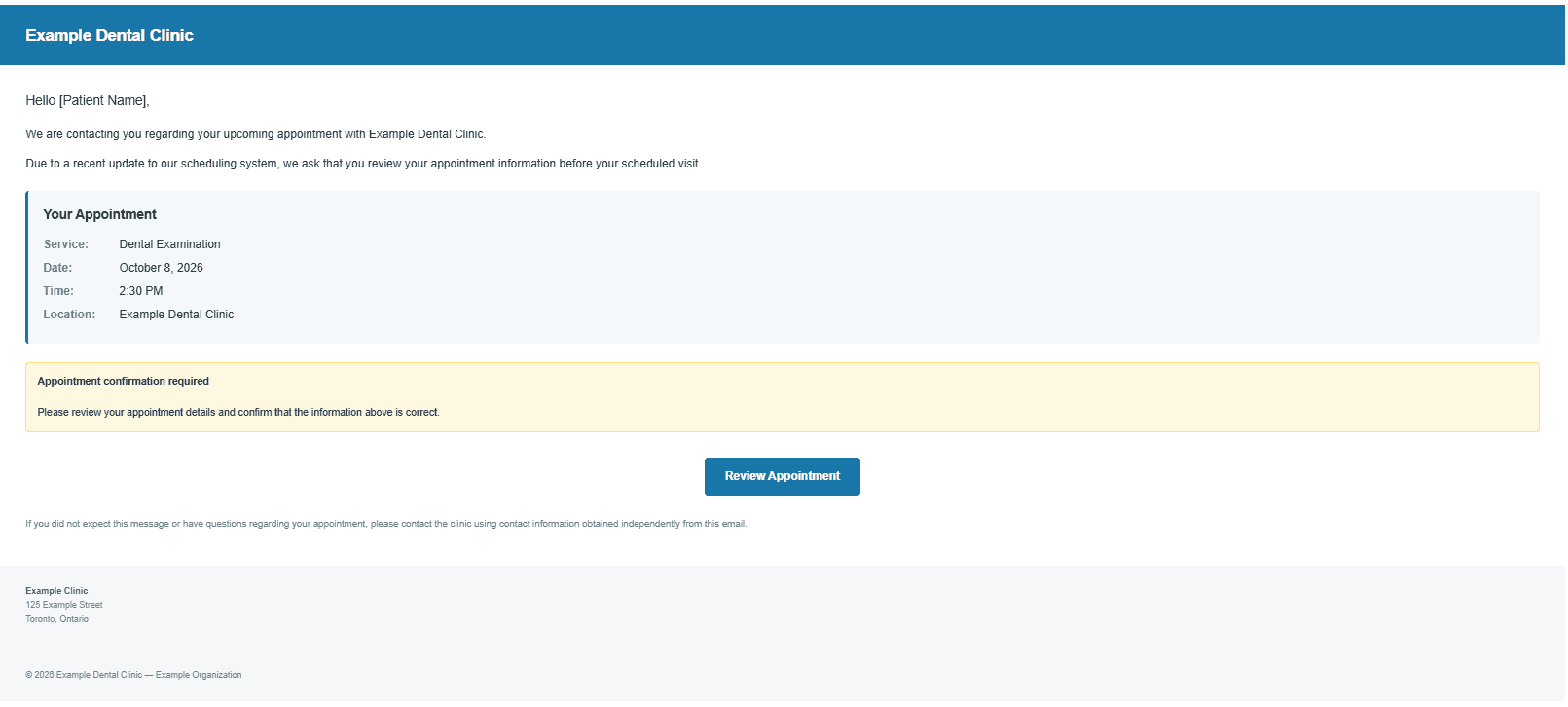
- Personalization: specific details make the message appear connected to the recipient.
- Urgency: a confirmation deadline or required action encourages a quick response.
- Credibility: consistent branding, polished formatting, and formal language can imitate routine service communication.
- Call to action: a button can obscure the destination behind familiar wording.
How to assess the message safely
A professional appearance is not proof of legitimacy. Review the message as a set of claims that need independent confirmation. Do not use the message’s button or contact details to verify its story.
- 01Check the actual sender
Inspect the full From address and domain, then compare them with a known address for the organization. A display name is easy to imitate.
- 02Inspect the link destination
Preview or safely inspect the destination without opening it. Look for an unexpected domain, redirects, misspellings, or a destination unrelated to the claimed service.
- 03Verify the story independently
Use a saved bookmark, a known official website, or a phone number from a trusted source to confirm the appointment, requested change, and need to act.
- 04Review the message source
When appropriate, inspect raw headers, Reply-To, authentication results, embedded URLs, and routing information.
- 05Combine the clues
One unusual detail may have an innocent explanation. Consider whether sender, destination, request, timing, and independently verified facts tell a consistent story.
If you suspect a work message is malicious, report it through your organization’s approved process. Avoid forwarding it casually or interacting with links and attachments.
Judge the whole situation, then verify
An effective phishing message may not contain one obvious giveaway. Relevance, personalization, urgency, and a credible presentation can combine to make a request seem ordinary.
The central question is not simply whether the email looks professional. It is whether the sender, link, timing, and request make sense when checked against information obtained independently.
Sources
- 2025 Data Breach Investigations Report ↗ Verizon · Incident and breach findings cited in this research.
- Phishing Trends Report (2026) ↗ Hoxhunt · Vendor network analysis of reported phishing and AI indicators.
- Phish Tests Reveal Human-Targeted Threats Are Evolving ↗ Proofpoint · Research on social engineering themes and human response.
- Phishing concept on textured background ↗ Pexels · Cover photograph for the research card.